

Pro-Active Antialiasing#
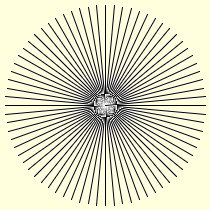
Alois Zigl's algorithm, in all octants#
The 45° lines have antialiasing

Modified Alois Zigl's algorithm, in all octants#
The 45° lines have no antialiasing
Look closely at the output of the antialiased lines, all the lines were drawn at regular 5° intervals and there is no anomoly close to the main axes seen previously.
To date the method of antialiasing had been based on drawing larger than required then bringing the drawing back to the correct size with a resampling filter. The advantage of this method is that it involves standard PIL methods and is straightforward. The results are reasonable enough to use, but some errors can creep in, which are difficult to rectify.
As we saw with Alois Zigle's algorithm we obtain the values of the errors between the theoretical line position and the pixels activated to represent the line on the monitor.
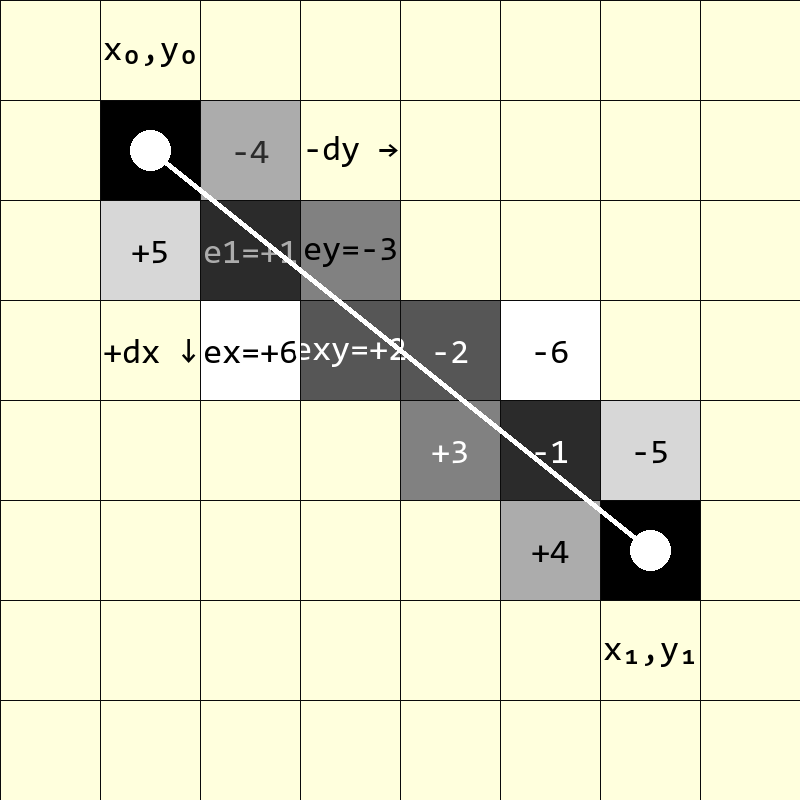
Line drawn from (x0, y0) to (x1, y1) showing the pixels required for antialiasing.#
The line is the same as the previous example. Any pixel with an absolute value of 6 or less will be coloured.
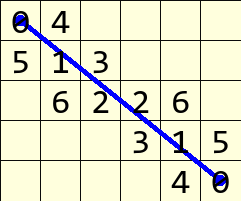
Antialias values from rasterization algorithm#
Pixel colour depends on the absolute value
When working with Alois' antialiasing algorithm the error values of pixels are required both sides of the theoretical line. Integer values are given to the distance of the pixel away from the theoretical line, higher integers being further away from the line than lower values.
Take the example and extend the error values to include ones used for antialiasing. Alois has used the diagonal pixels immediately after line pixel position. At the starting pixel (x0, y0) two pixelsL are used for antialiasing, the first pixel one in the x-direction (x0+1, y0), the second in the y-direction (x0, y0+1). These two pixels sit diagonally on either side of the line just after the start pixel. Repeat this down the line until the endpoint.
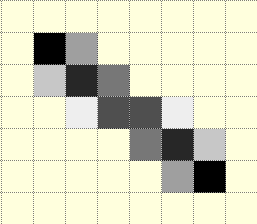
Alois Zigl's antialiased line#
Look where the original pixel line is drawn, without antialiasing the line pixels would all have been black, but with antialiasing the line becomes lighter but still remains darker than the antialiasing pixels.
If the criterion for deciding which pixels should be coloured for antialiasing is changed, we might opt for a vertical or horizontal distance of one pixel, in this case only those pixels that clipped the theoretical line are chosen, and those pixels with an error less than 5 would have been chosen, eliminating those with a value of 5, 6 or 7.
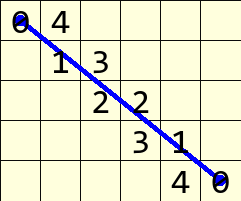
Antialias values similar to Wu's algorithm#
Fewer pixels, but those that remain are unaltered
Apart from the two end pixels, the other pixels have one antialias partner, in the example the pair of pixel absolute values add up to 5. In principle, except for the end conditions, this looks similar to Xiaolin Wu's algorithm.
Once the simple line was sorted out the antialiased lines were not too difficult to program. The main difference between the original and modified output was at 45° where the standard Alois' algorithm gave additional antialiasing pixels and the modified algorithm (like Wu's algorithm) had no antialiasing pixels. This algorithm is far simpler than Xiaolin Wu's algorithm, with only the antialiasing colouring requiring floating point arithmetic.
Show/Hide Antialiased Line One Pixel Wide
def plotLineAA(draw, pta, ptb, fill='black'):
 # draw a black (0) anti-aliased line on white (255) background
 x0, y0 = pta
 x1, y1 = ptb
 dx = abs(x1 - x0)
 dy = abs(y1 - y0)
 sx = 1 if x0 < x1 else -1
 sy = 1 if y0 < y1 else -1
 err = dx - dy                            # error value e_xy

 ed = dx + dy

 ed = 1 if ed == 0 else sqrt(dx*dx+dy*dy) # max(dx, dy) #
 dr = dx + 1 if dx > dy else dy + 1      # better plotting when steep

 for x in range (dr):                    # pixel loop
     hue = int(255*abs(err-dx+dy)/ed)
     draw.point([x0, y0], fill=(hue, hue, hue))
     e2 = err
     x2 = x0
     if e2<<1 >= -dx:                    # y-step
         if e2+dy < ed and x < dr - 1:
             hue = int(255*(e2+dy)/ed)
             draw.point([x0,y0+sy], fill=(hue, hue, hue))
         err -= dy
         x0 += sx
     if e2<<1 <= dy and x < dr - 1:      # x-step
         if dx-e2 < ed:
             hue = int(255*(dx-e2)/ed)
             draw.point([x2+sx,y0], fill=(hue, hue, hue))

         err += dx
         y0 += sy
To obtain an antialiased line that is similar to Wu's algorithm, change the highlighted line from:
ed = 1 if ed == 0 else sqrt(dx*dx+dy*dy)
to:
ed = 1 if ed == 0 else max(dx, dy)
Notice the similarity to the straight line algorithm.