

Slanting Dimension#
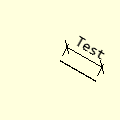
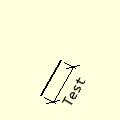
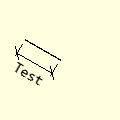
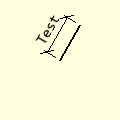
Slanting Dimensions
Sloping at 30°
Sloping at 120°
Sloping at 210°
sloping at 300°
Slanting Dimension Properties#
Show/Hide Slanting Dimension Attributes
- im
PIL image handle, link to the calling program
- dr
PIL drawing handle, link to the calling program
- ptA
Start coordinates
- ptB
Finishing coordinates, optional default None
- extA
Two integer tuple, giving the extension line size and gap next to start default (8,3)
- angle
Slope of dimension, optional default None
- length
Dimension length, optional default None
- text
Dimension text, optional default None
- font
Font of the text, optional default None
- fill
Line colour RGB tuple, default (0,0,0)
- width
Line width in pixels, default 1
- arrowhead
Three integer tuple describing the shape and size of the arrow
- arrow
position of the arrow on the line, which influences the direction it points.
- tail
Show tails or arrows, default True
This dimension is set parallel to the slanting surface, with extensions
perpendicular to the dimension and object. The text is set outside of the
dimension with the text orientation running parallel to the dimension. Use
either 45° short stubs or arrows, select tail True for 45° stubs.
Unlike the outer dimension the start and finishing points are
on the item.
In essence apart from the complication of the angled geometry, it follows much the same pattern as the outer dimension. Specify the dimension position by giving two coordinates from the object, ptA and ptB, perpendicular distance of the extension, extA, alternatively give the start position and angle with dimension length. It is assumed that both extensions are of equal size.
If the text lies on the wrong side add 180° to the angle.
Show/Hide Code test_slant_dim.py
from PIL import Image, ImageDraw, ImageFont
from math import radians, atan2, sin, cos, degrees
from DimLinesPIL import polar2cart, int_up, angled_text, dimension


def slant_dim(im, dr, ptA, ptB=None, extA=None,  angle=None, length=None,
              fill=(0,0,0), text=None, font=None, tail=True,
              arrowhead=(8,10,3), arrow='both'):
    # slanting dimension with 45° tails
    # extension tuple first number drawn, second space
    # ptA point on item surface

    if isinstance(extA, int) or len(extA) == 1:
        exta = extA if isinstance(extA, int) else extA[0]
    elif len(extA) == 2:
        exta = extA[0]
        if extA[0] * extA[1] < 0:
            raise Exception('extA: both entries of extension tuple extA {} ' \
                'should either be positive or negative'.format(extA))
    else:
        raise Exception('slant_dim: The leader tuple extA {} should be one or ' \
                'two entries'.format(extA))

    if ptB is None and length and 0 <= angle <360:
        phir = radians(angle)
        ptB = polar2cart(ptA, angle, length)
    elif length is None and ptB:
        phir = atan2(ptB[1]-ptA[1], ptB[0]-ptA[0])
        angle = int_up(degrees(phir))
    else:
        raise Exception('slant_dim: Either supply ptB {}, or length {} and ' \
                'angle {}'.format(ptB, length, angle))

    # extensions, leave a gap if extA 2 entries
    angle = angle if exta > 0 else angle + 180
    ptA3 = polar2cart(ptA, angle-90, 3)
    ptAe = polar2cart(ptA, angle+90, exta)
    dr.line([ptA3, ptAe], width=1, fill=fill)
    ptB3 = polar2cart(ptB, angle-90, 3)
    ptBe = polar2cart(ptB, angle+90, exta)
    dr.line([ptB3, ptBe], width=1, fill=fill)

    # dimension line
    if tail:
        dr.line([ptA, ptB], width=1, fill=fill)
        # create 45° end stubs
        dirn = radians(45 + angle)
        p3=ptA[0]+7*cos(dirn),ptA[1]+7*sin(dirn)
        p4=ptA[0]-7*cos(dirn),ptA[1]-7*sin(dirn)
        p5=ptB[0]+7*cos(dirn),ptB[1]+7*sin(dirn)
        p6=ptB[0]-7*cos(dirn),ptB[1]-7*sin(dirn)

        dr.line([p3,p4], width=1, fill=fill)
        dr.line([p5,p6], width=1, fill=fill)
    else:
        dimension(dr, ptA, ptB=ptB, fill=fill,
                     arrowhead=arrowhead, arrow=arrow)

    font = ImageFont.load_default() if font is None else font
    tsize = font.getsize(text)

    h = tsize[1] // 2

    #angle = 90 + angle
    angle = 360 + angle if angle < 0 else angle
    angle = angle - 360 if angle >= 360 else angle

    j = 1 if exta > 0 else - 1
    mid = (ptA[0] + ptB[0])/2, (ptA[1] + ptB[1])/2
    at =  int_up(mid[0] + j * (h + 7) * sin(phir)), \
            int_up(mid[1] - j * (h + 7) * cos(phir))

    angled_text(im, at, text, angle, font, fill=fill, aall=0)

if __name__ == "__main__":
    Text = 'Test'
    Angle = 315
    At = (60, 60)
    ptb = (30, 30)
    Length = 50
    exta = (10,3) #15 #
    Font = ImageFont.truetype('consola.ttf', 15)

    image2 = Image.new('RGB', (120, 120), '#FFFFDD')

    sdraw = ImageDraw.Draw(image2)
    ct = polar2cart(At, Angle, Length)
    #print(ct,'ct')

    #sdraw.line([At, ct], width=2, fill='blue')

    slant_dim(image2, sdraw, At, extA=exta, fill=(0,0,0), length=Length,
                    angle=Angle, text=Text, font=Font, tail=False) #

    image2.show()
    #image2.save('../figures/slant_dim_'+str(angle) +'.png')