

Angle Dimension#
,,
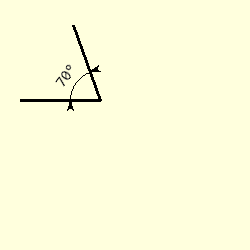
Normal Angles
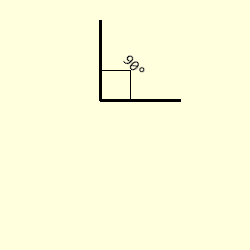
Right Angle
First Sector
Second Sector
Third Sector
Fourth Sector
Fourth Sector



Angle Dimension Properties#
Show/Hide Angle Dimension Attributes
PIL has a separate arc method with the following properties.
- xy
Four points to define the bounding box. Sequence of [(x0, y0), (x1, y1)] or [x0, y0, x1, y1].
- start
Starting angle, in degrees
- end
Ending angle, in degrees.
- fill
Arc colour
Angled dimension is similar to the arc with some changes
- im
PIL image handle, link to the calling program
- centre
Arc's circle centre
- radius
Arc's circle radius
- begin
Starting angle, in degrees
- end
Ending angle, in degrees.
- fill
Arc colour
- text
Text to be written next to the dimension
- font
Font of the text
- arrowhead
Three integer tuple describing the shape and size of the arrow
Create Angled Dimension#
The arcs used for dimensions are based on circles rather than ellipses, so use the arc centre, its radius and the start and end angles, rather than the box surrounding the circle containing the arc:
def create_arc(draw,centre,radius,start,end,fill='black'):
    # create arc with centre and radius
    return draw.arc([centre[0]-radius,centre[1]-radius,centre[0]+radius,
                    centre[1]+radius], start=start, end=end, fill=fill)
Another useful utility function is the conversion from polar to cartesian coordinates:
def polar2cart(centre, phi, ray, units='degrees'):
# convert polar to cartesian coordinates
if units == 'degrees':
    phi = radians(phi)
elif units == 'radians':
    pass
else:
    raise Exception('polar2cart: units {} can only be "degrees" or "radians"'\
        .format(units))

dx = ray * cos(phi)
dy = ray * sin(phi)
x = centre[0] + dx
y = centre[1] + dy

return int_up(x), int_up(y)
The arc dimension shows the angle directly, so no extension lines are required, add the text straightaway. Use the PIL image reference, centre, radius, begin and end angles, followed by the text and its font and finally the arrow shape. The attribute arrow is not used as the selection is made automatically.
Once we have extracted the values from the tuples, calculate the coordinates of the begin and end positions. Check whether the arrows need to be inward or outward pointing (depends on the arc size). Lastly position the text according to the text and arc sizes.
Add a conditional statement to draw a right angle square lines for 90° instead of an arc. If the angle becomes a straight line raise an error.
Show/Hide Code test_angle_dim.py
from PIL import Image, ImageFont, ImageDraw
from math import sqrt, radians, sin, cos
from DimLinesPIL import polar2cart, create_arc, angled_text, dimension


def arc_dim(im, dr, centre, radius, begin, end, fill=(0,0,0),
            text=None, font=None, arrowhead=(8,10,3)):
    # x,y,radius all relate to centre coords and radius, give 2 angles
    # arcs all less than 180

    beginr = radians(begin)
    endr = radians(end)
    alpha = (begin + end) / 2 #if begin < end else (begin + 360 + end) / 2
    diff = end - begin # if begin < end else end + 360 - end
    if diff == 180:
        raise Exception('angle dimension: angle is 180°, begin {} end {}' \
            ' difference {} cannot draw dimension'.format(begin, end, diff))

    if diff == 90:
        ax, ay = polar2cart(centre, begin, radius)
        bx, by = polar2cart(centre, end, radius)
        dx, dy = polar2cart(centre, alpha, radius*sqrt(2))

        dr.line([(ax,ay), (dx,dy)], fill=fill)
        dr.line([(bx,by), (dx,dy)], fill=fill)

    else:
        x, y = centre

        create_arc(dr,centre,radius, begin, end, fill=fill)
        # find begin and end arc
        start = x + radius * cos(beginr), y + radius * sin(beginr)
        finish = x + radius * cos(endr), y + radius * sin(endr)

        # placement of arrows, 'first' point outwards
        order = 'last' if abs(endr - beginr) * radius > 4 * arrowhead[1] else 'first'

        dimension(dr, start, angle=(begin - 90), arrow=order)
        dimension(dr, finish, angle=(end + 90), arrow=order)

    # placement of text
    wide, ht = font.getsize(text)

    angle = 90 - (begin + end) / 2
    angle = 360 + angle if angle < 0 else angle
    angle = angle - 360 if angle >= 360 else angle
    '''
    # stop upside down text
    if 0 <= angle <= 180:
        angle = 90-angle
        da = 0
    elif 180 < angle < 360:
        angle = 270-angle
        da = 7
    '''

    el = wide/2/sin(radians(diff/2))
    ray = max(radius*0.8,el)

    if diff == 90:
        X, Y = polar2cart(centre, alpha, ray*1.7) # radius * sqrt(2) + da
    else:
        X, Y = polar2cart(centre, alpha, (ray+ht)*1.1) # radius + height/2 + da #*1.3

    angled_text(im, (X, Y), text, angle, font=Font, fill=fill, aall=0)


if __name__ == "__main__":
    # Create an empty image
    w, h = 250, 250
    image1 = Image.new('RGBA', (w,h), '#FFFFDD')
    sdraw = ImageDraw.Draw(image1)

    c=(100,100)
    r=30
    Start=350
    End=375
    Text = str(End-Start) + '°' #if Start < End else str(End + 360 -Start) + '°'

    font_size=15
    Font = ImageFont.truetype('consola.ttf', font_size)

    Ax, Ay = polar2cart(c, Start, 80)
    sdraw.line([c, (Ax, Ay)], width=3, fill='blue')

    Bx, By = polar2cart(c, End, 80)
    sdraw.line([c, (Bx, By)], width=3, fill='blue')

    arc_dim(image1, sdraw, c, r, Start, End, text=Text, font=Font)
    image1.show()
    #image1.save('../figures/angle_dim_'+ str(start)+'_'+str(end-start)+'.png') # show()