

Inner Dimension#
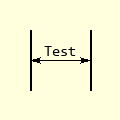
Inner Dimensions
Horizontal
Vertical

Inner Dimension Properties#
This dimension uses the line dimension and angled text, but only works in an orthogonal manner.
Show/Hide Inner Dimension Attributes
- im
PIL image handle, link to the calling program
- dr
PIL drawing handle, link to the calling program
- ptA
Start coordinates
- ptB
Finishing coordinates
- text
Text to be written next to the dimension, default None
- font
Font of the text, default None
- fill
Line colour RGB tuple, default (0,0,0)
- width
Line width in pixels, default 1
- arrowhead
Three integer tuple describing the shape and size of the arrow, default (8,10,3)
- arrow
position of the arrow on the line, which influences the direction it points, default "both".
Normally inner dimensions are not slanted. The position of the text changes according to orientation, so angled_text is used.
Show/Hide Code test_inner_dim.py
from PIL import Image, ImageDraw, ImageFont
from math import pi, sin, cos
from DimLinesPIL import dimension, angled_text

def inner_dim(im, dr, ptA, ptB, text=None, font=None, width=1, fill=(0,0,0),
              arrowhead=(8, 10, 3), arrow='both'):
    # used on horizontal or vertical inner dimensions

    dimension(dr, ptA, ptB, width=width, fill=fill, arrowhead=arrowhead,
              arrow='both')
    # vertical
    if ptA[0] == ptB[0]:
        at = ptA[0] - 10, (ptA[1] + ptB[1]) //2
        angle = 90

    # horizontal
    elif ptA[1] == ptB[1]:
        at = (ptA[0] + ptB[0]) // 2, ptA[1] - 10
        angle = 0
    else:
        raise Exception('The inner dimension: should be vertical or horizontal '\
                        '{} {} coordinates'.format(ptA, ptB))

    angled_text(im, at, text, angle, font=font, fill=fill)

    return im

if __name__ == '__main__':
    Text = 'Test'
    Font = ImageFont.truetype('consola.ttf', 15)

    image2 = Image.new('RGB', (120, 120), '#FFFFDD')

    draw2 = ImageDraw.Draw(image2)

    draw2.line([(30,30), (90,30)], width=2, fill='black')
    draw2.line([(30,90), (90,90)], width=2, fill='black')

    pta = (60,30)
    ptb = (60,90)

    inner_dim(image2, draw2, pta, ptb, text=Text, font=Font)

    image2.show()
    #image2.save('../figures/vert_inner.png') #