

Level Dimensions#
Level Properties#
Show/Hide Level Dimension Attributes
- im
PIL image handle, link to the calling program
- dr
PIL drawing handle, link to the calling program
- at
Coordinates at left tank wall level
- diam
Tank diameter, pixels
- ldrA
Inclined leader length, default 20
- ldrB
Horizontal leader length, default 20
- ext
Tuple of length external extender and gap, if an integer then the extender touches the vessel wall, unless it is 0 then the dimension becomes internal, default 0
- dash
Tuple giving dash pattern, dash length then gap default (10, 4)
- text
Dimension text, default None
- font
Font of the text, default None
- fill
Dimension colour RGB tuple, default (0,0,0)
- tri
Level indicator, equilateral triangle default 8

Level dimension inside a tank#
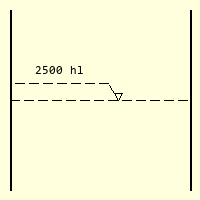
Level dimension negative leader#
Contents of a tank are shown with dashed line and dashed leaders. The dashed
lines are made using a dashed line created from a function created in the
next section, although the plain Bresenham/Zigl algorithm can be used. Apart
from
the starting position, diameter of tank, the user can choose different dash
patterns, the inclined leader length and the indicating triangle size. The
dimension lies on the righthand side of the vessel, if a
negative value ldrA is used the dimension is on the lefthand side.
If the normal level dimension cannot be used then an outside dimension can
be used. This has an extension line outside of the vessel, the indicating
triangle sits on the extension line. As the leaders are outside of the vessel
they are drawn solidly. The extender ext can be a single integer, in
which case the line touches
the vessel or as a tuple of two values, the first being the line length, the
second the gap length.

Level dimension outside a tank#
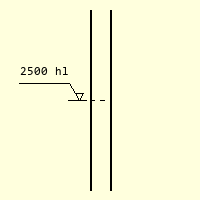
Outside level dimension negative leader#
Show/Hide Code level_dim.py
from PIL import Image, ImageDraw, ImageFont
from math import sin, pi
from DimLinesPIL import DashedLine, int_up, angled_text


def dim_level(im, dr, at, diam, ext=0, ldrA=20, ldrB=20, dash=(10,4), text=None,
              font=None, fill=(0,0,0), tri=8):
    # at on left tank wall, diam internal tank diameter,
    # triangle on top of level (8,8,8) p0 tip triangle, p1, p2 angles, p2 on at-p4
    # p3 opposite side to at, both drawn to inside tank wall
    # leader (ldr) at 60° up to p4 then horizontal to p5

    # check dash input
    if len(dash)%2 == 0 or len(dash) ==1:
        pass
    else:
        raise Exception('The dash tuple: {} should be one or an equal number '\
                        'of entries'.format(dash))

    if isinstance(ext, int) or len(ext) == 1:
        exto = ext if isinstance(ext, int) else ext[0]
    elif len(ext) == 2:
        exto = sum(ext)
    else:
        raise Exception('out_dim_level: The extension tuple ext {} should be one' \
                        ' or two entries'.format(ext))

    font = ImageFont.load_default() if font is None else font

    (wide, ht) = font.getsize(text)

    angle = 0

    # check whether left or right position
    if ldrA > 0:
        if ext == 0:
            p0 = (int_up(at[0] + diam * 0.4), at[1])
            p4 = (int_up(p0[0] + ldrA * 0.5), p0[1] - int_up(ldrA * sin(pi/3)))
            p5 = (at[0] + diam, p4[1]) if ldrB < diam else (at[0] + diam + ldrB,
                                                            p4[1])
        else:
            p0 = (int_up(at[0] + diam + 0.6 * exto), at[1]) # tip triangle
            p4 = (int_up(p0[0] + ldrA * 0.5), p0[1] - int_up(ldrA * sin(pi/3))) # top ldr
            p5 = (p4[0] + ldrB, p4[1]) # end ldr
    else:
        if ext == 0:
            p0 = (int_up(at[0] + diam * 0.6), at[1])
            p4 = (int_up(p0[0] + ldrA * 0.5), p0[1] + int_up(ldrA * sin(pi/3)))
            p5 = (at[0], p4[1])
        else:
            p0 = (int_up(at[0] - 0.6 * exto), at[1])
            p4 = (int_up(p0[0] + ldrA * 0.5), p0[1] + int_up(ldrA * sin(pi/3)))
            p5 = (p4[0] - ldrB, p4[1])

    ldr_w = abs(p5[0] - p4[0])
    if ldr_w < wide:
        raise Exception('The leader width is too small: {} should be larger '\
                        'than the text width {}'.format(ldr_w, wide))

    p2 = (p0[0] + tri * 0.5, p0[1] - int_up(tri * sin(pi/3)))
    p1 = (p2[0] - tri, p2[1])
    p3 = (at[0] + diam, at[1]) # outer wall

    DashedLine(dr, at, end_pos=p3, dash=dash, width = 1, fill=fill)
    dr.polygon( [p0, p1, p2], outline=fill)

    if ldrA > 0:
        if ext == 0:
            DashedLine(dr, p2, p4, dash=dash, fill=fill, width=1)
        else:
            dr.line([p2, p4], fill=fill, width=1)
            dr.line([p3, (p3[0] + exto, at[1])], width = 1, fill=fill)
    else:
        if ext ==0:
            DashedLine(dr, p1, p4, dash=dash, fill=fill, width=1)
        else:
            dr.line([p1, p4], fill=fill, width=1)
            dr.line([at, (at[0] - exto, at[1])], width = 1, fill=fill)

    if ext == 0:
        DashedLine(dr, p4, p5, dash=dash, fill=fill)
    else:
        dr.line([p4, p5], width = 1, fill=fill)

    p6 = (int((p4[0] + p5[0])//2), p4[1] - ht - 5)

    angled_text(im, p6, text, angle, font, fill=fill)

if __name__ == "__main__":
    Font = ImageFont.truetype('consola.ttf', 12)
    #wide, height = font.getsize('(30, 84)')

    w, h = 200, 200
    image = Image.new('RGB', (w,h), '#FFFFDD')

    draw = ImageDraw.Draw(image)

    a=(90,10)
    b=(90,190)
    c=(110,10)
    d=(110,190)

    draw.line([a,b], width=2, fill='blue')
    draw.line([c,d], width=2, fill='blue')

    At=(a[0],100)
    Diam = c[0] - a[0]

    Fill=(0,0,0)

    dim_level(image, draw, At, Diam, ldrA=-20, ldrB=50, dash=(4,4), text='2500 hl',
              fill=Fill, tri=8, font=Font, ext=40)

    image.show()
    #image.save('../figures/level_dim_neg.png') # show()