

Inner AA Dimension#
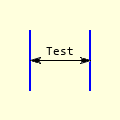
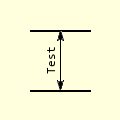
Inner Dimensions
Horizontal
Vertical
Inner AA Dimension Attributes#
This is similar to the LineAA dimension, except that text and font have been added and angle is no longer necessary.
Show/Hide inner_dim_aa properties
- im
PIL image handle, link to the calling program
- dr
PIL draw handle, link to the calling program
- ptA
Start coordinates
- ptB
Finishing coordinates
- text
Text to be written next to the dimension
- font
Font of the text
- fill
Line colour, as an RGB tuple
- arrowhead
Three integer tuple describing the shape and size of the arrow
- arrow
position of the arrow on the line, which influences the direction it points.
- back
Background colour, as an RGB tuple
Normally inner dimensions are not slanted. The position of the text changes according to orientation, so still use angled_text.
Show/Hide Code test_inner_aa_dim.py
import sys
sys.path.append('../dims')

from PIL import Image, ImageDraw, ImageFont
from DimLinesAA import dimension_aa
from DimLinesPIL import angled_text

def inner_dim_aa(im, dr, ptA, ptB, text=None, font=None, width=1, fill=(0,0,0),
              arrowhead=(8, 10, 3), arrow='both', back=(225,225,221)):
    # used on horizontal or vertical inner dimensions

    dimension_aa(im, dr, ptA, ptB, fill=fill, arrowhead=arrowhead,
              arrow='both', back=back)
    # vertical
    if ptA[0] == ptB[0]:
        at = ptA[0] - 10, (ptA[1] + ptB[1]) //2
        angle = 90

    # horizontal
    elif ptA[1] == ptB[1]:
        at = (ptA[0] + ptB[0]) // 2, ptA[1] - 10
        angle = 0
    else:
        raise Exception('The inner dimension: should be vertical or horizontal '\
                        '{} {} coordinates'.format(ptA, ptB))

    angled_text(im, at, text, angle, font=font, fill=fill)

if __name__ == '__main__':
    Text = 'Test'
    Font = ImageFont.truetype('consola.ttf', 15)

    Back = (255,255,221)
    image = Image.new('RGB', (120, 120), Back)

    draw = ImageDraw.Draw(image)

    Fill = (0,0,0)

    draw.line([(30,30), (90,30)], width=2, fill=Fill)
    draw.line([(30,90), (90,90)], width=2, fill=Fill)

    ptA = (60,30)
    ptB = (60,90)

    inner_dim_aa(image, draw, ptA, ptB, text=Text, font=Font, fill=Fill, back=Back)
    #im, ldraw, ptA, ptB, text=None, font=None, fill=(0,0,0),
              #arrowhead=(8, 10, 3), arrow='both', back=(225,225,221))

    #image.save('../figures/vert_inner.png') #
    image.show()