The method of selecting the dash configuration was based on table 10 in the
Canvas Line options "Tkinter 8.5 reference a GUI for Python". Here a
single entry in the tuple produces alternate dashes and spaces of equal
length, whereas a larger number of entries specify the dash and space
pattern. For instance
dash=(3,5)
would produce a 3-pixel dash followed by 5-pixel of space, this pattern is
repeated for the line length, whereas (7, 1, 1, 1) creates a 7-pixel dash
followed by a space then a dot and finishes with a space. Finally dash = (5,)
would show as 5-pixel dash followed by a 5-pixel space.
Note
The dash tuple should be either a single entry, or an even number
of entries.
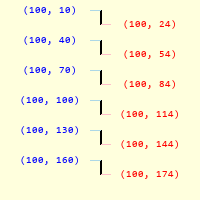
Blue values on left are start array, red values on right are end array.
Size of pattern is 30 pixels, each array has 30 pixel steps. First dash
between (100,10) and (100,24), first gap between (100,24) and (100,40),
this pattern is repeated.
The examples upto now dealt with a two entry tuple, The first
linspace gives us the coordinates of the starts of the first dash, for the
number of times the pattern is repeated. Similarly the second linspace gives
the endings of the dash, creating values in synch with the start array, after
that there is a gap to the start of the next pattern.
At the start of the function the dash entries were extracted. There is no set
pattern but we can determine its length, as it is difficult to allocate
variables beforehand, determine the value of the current dash or gap, which
always come alternately.
Blue values on left are the start array, red values on right are end the
array. Size of pattern is 30 pixels, each array has 30 pixel steps. First
a dash between (100,10) and (100,30), the first gap between (100,30) and
(100,34), then a dash between (100,34) and (100,36), finally a gap
between (100,36) and (100,40), this pattern is repeated.
Note
Compare the two figures, as the sum of the dashes and gaps is
the same for both patterns ((15,15) and (21,3,3,3)) the steps within the
arrays are the same. Further both lines start and finish at the same
points, so the start array for (15,15) is the same value for (21,3,3,3)
in its first start array.
Look at the existing function script, the only adjustment was the dash
length minus one was used at the start of the end array
and the length of the dash gap combination. Add the dash
tuple extraction to the current script and put in a while loop for the
linspace and concatenation functions, then run with a two entry dash tuple:
Having seen what happens with
a two entry
dash tuple, try it with a four entry dash (21,3,3,3). Not all the dashes show
because there are two passes of the while loop. Only arrays of the same
dimension can be concatenated, so on the first pass create
all_arr from the start and end arrays,
on the next pass join the previous result to the newly
formed arrays:
As explained before, the very first start array works with the overall size
of the dash tuple, so put any adjustments to the next start array
at the end of the while loop:
Use dash_plus instead of dash2 to highlight the difference.
The adjustments to the dash endings are changed from dash2 to dash_minus for
consistency.
Show/Hide Code 08dash_gap_function.py
importsyssys.path.append('../dims')fromPILimportImage,ImageDraw,ImageFontfrommathimportdist,atan2,sin,cosfromnumpyimportarray,linspace,concatenate,int_fromDimLinesPILimportint_updefline_dashed(dr,start_pos,end_pos,dash=(5,5),width=1,fill='black'):# create dashed lines in PIL# unpack tuplesx0,y0=start_posx1,y1=end_posiflen(dash)==1:dash=dash+dashtheta=atan2(y1-y0,x1-x0)# sort out lengthsdash_gap_length=sum(dash)line_length=dist(start_pos,end_pos)all_arr=None# adjust length to suit start and end positions if requiredifline_length%dash_gap_length!=0:factor=line_length//dash_gap_lengthline_length=factor*dash_gap_lengthx1=int_up(x0+line_length*cos(theta))y1=int_up(y0+line_length*sin(theta))# inclusive number of dashes and gapsdash_amount=int_up(line_length/dash_gap_length)+1whilelen(dash)>0:start_arr=linspace((x0,y0),(x1,y1),dash_amount)dash0,*dash=dashdash_minus=dash0-1# make second part of the line arrayx0=x0+int_up(dash_minus*cos(theta))y0=y0+int_up(dash_minus*sin(theta))x1=x1+int_up(dash_minus*cos(theta))y1=y1+int_up(dash_minus*sin(theta))end_arr=linspace((x0,y0),(x1,y1),dash_amount)ifall_arrisNone:all_arr=concatenate([start_arr,end_arr],axis=0)else:all_arr=concatenate([start_arr,end_arr,all_arr],axis=0)dash0,*dash=dashdash_plus=dash0+1x0=x0+int_up(dash_plus*cos(theta))y0=y0+int_up(dash_plus*sin(theta))x1=x1+int_up(dash_plus*cos(theta))y1=y1+int_up(dash_plus*sin(theta))# sort along the column, where the maximum change occursifabs(x1-x0)>abs(y1-y0):fin_arr=int_(all_arr[all_arr[:,0].argsort()])else:fin_arr=int_(all_arr[all_arr[:,1].argsort()])nr_lines=len(fin_arr)[dr.line([tuple(fin_arr[n]),tuple(fin_arr[n+1])],width=width,fill=fill)forninrange(0,nr_lines,2)]if__name__=="__main__":Font=ImageFont.truetype('consola.ttf',12)arr=array([[10,30],[16,30],[18,30],[18,30],[20,30],[26,30],[28,30],[28,30],[30,30],[36,30],[38,30],[38,30],[40,30],[46,30],[48,30],[48,30],[50,30],[56,30],[58,30],[58,30],[60,30],[66,30],[68,30],[68,30],[70,30],[76,30],[78,30],[78,30],[80,30],[86,30],[88,30],[88,30],[90,30],[96,30],[98,30],[98,30]])Dash=(7,1,1,1)Start_pos=(10,30)# (30, 10)End_pos=(90,30)# (30, 90)#x0, y0 = (30, 10)#x1, y1 = (30, 90)w,h=100,100image=Image.new('RGB',(w,h),'#FFFFDD')draw=ImageDraw.Draw(image)#wide, height = Font.getsize('(30, 84)')unused1,unused2,wide,height=Font.getbbox('(30, 84)')line_dashed(draw,Start_pos,End_pos,dash=Dash,width=1,fill='black')#line_dashed(image, (x0, y0), (x1, y1), dash=dash, width = 1, fill='black')image.show()


.png)
.png)