

Line and Gap Array#
Now create an array to replace the coordinates, and draw the line usng a
for loop and range. Start the range at 0 and run using the array size,
but at intervals of 2, so that every pair of coordinates draws the line from the
start of the coordinate pair to the next coordinate pair. Arrange as a list
comprehension method.
nr_lines = len(arr)
[draw.line([tuple(arr[n]), tuple(arr[n+1])], width=1, fill='black')
        for n in range(0, nr_lines, 2)]
If all goes correctly the output should look the same as the previous script, in particular the line and gap sizes.
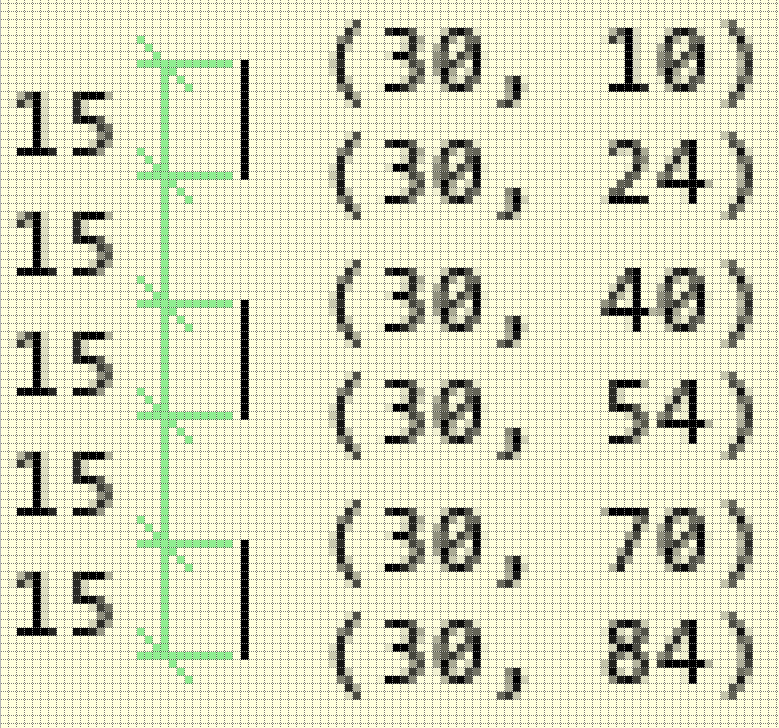
Drawing three lines and two gaps using an array#
Show/Hide Code 03line_start_finish_array.py
import sys
sys.path.append('../dims')

from PIL import Image, ImageDraw, ImageFont
from DimLinesPIL import angled_text, dims

Font = ImageFont.truetype('consola.ttf', 12)

w, h = 100, 100
image = Image.new('RGB', (w,h), '#FFFFDD')

arr =[(30, 10),
(30, 24),
(30, 40),
(30, 54),
(30, 70),
(30, 84)]

print('len(arr)', len(arr), arr)
nr_lines = len(arr)

draw = ImageDraw.Draw(image)
'''
draw.line([a, b], fill='black')
draw.line([c, d], fill='black')
draw.line([e,f], fill='black')
'''

[draw.line([tuple(arr[n]), tuple(arr[n+1])], width=1, fill='black')
            for n in range(0, nr_lines, 2)]

# width, height = Font.getsize(str(arr[4]))
unused1, unused2, width, height = Font.getbbox(str(arr[4]))

for i in range(nr_lines):
    angled_text(image, (arr[i][0] + 10 + width//2, arr[i][1]),text=str(arr[i]),
            angle=0, fill='black', font=Font)

for j in range(nr_lines - 1):
    dims(image, draw, arr[j], arr[j+1], (8, 2), text='15', font=Font, fill='lightgreen',
        textorient='horizontal')

image.show()